
Wayback Machine: The Complete Guide to Browsing Web History
By the Restorix editorial team · April 30, 2026 · 8 min read
Restore your website from the Wayback Machine
Get a free estimate in seconds — you only pay when you confirm. Failed restores refund automatically.
The Wayback Machine has bailed me out more times than I can count. A client's WooCommerce store wiped by a bad plugin update. A competitor's pricing page from 2019, needed for a contract dispute. The original version of an article someone quietly rewrote after it got quoted in a lawsuit. It is the web's memory, and it costs nothing to use. Yet most people only ever touch the search box on the homepage and miss everything else. This guide covers how the archive actually works, every search trick worth knowing, where it falls short, and what to do when browsing snapshots is not enough and you need the site itself back.
What the Wayback Machine Actually Is
The Wayback Machine is a free public archive of web pages, run by the Internet Archive, a nonprofit digital library based in San Francisco. Brewster Kahle founded the organization in 1996, and the Wayback Machine opened to the public in 2001. The name is a nod to the WABAC machine, the time-travel gadget from the 1960s cartoon Peabody's Improbable History, which is also why so many people misremember it as 'the way back machine'.
The collection passed 900 billion archived web pages and keeps growing by well over a billion pages a week. Alongside web pages, the Internet Archive stores scanned books, TV news, audio, and old software you can run in the browser. Browsing costs nothing and needs no account.
One distinction matters before anything else: the Wayback Machine archives pages, not sites. Every snapshot is a single URL captured at a single moment. There is no 'whole site, March 2015' object sitting on a shelf, only thousands of individual page captures that happen to share a domain. Keep that in mind, because it explains almost every quirk you will run into later.
How Crawls and Snapshots Work
Restore your website from the Wayback Machine
Get a free estimate in seconds — you only pay when you confirm. Failed restores refund automatically.
The archive is built by crawlers. In its first years the Internet Archive relied on crawl data from Alexa Internet, a web-analytics company Kahle co-founded; today it runs its own crawling operation, plus partner crawls and millions of manual saves from users. A crawler requests a URL, stores the HTML it gets back, then fetches the assets that HTML references, images, stylesheets, scripts, each stored as its own file.
That last detail explains the most common confusion. A snapshot is not a folder frozen in time. The page HTML might be from March 3 while its stylesheet is from March 9 and the hero image from February 20. When everything lines up, the page renders fine. When it does not, you get the classic broken snapshot: text intact, layout wrecked, grey boxes where the photos should be.
How often a page gets crawled
There is no schedule you can count on. Crawl frequency follows prominence: a major newspaper homepage is captured thousands of times a day, while a 2009 phpBB forum might appear twice in a decade. If a page matters to you, do not wait for a crawler to care about it, save it yourself, a trick covered a few sections down.
What can block a crawl
The crawler respects robots.txt, and an exclusion can apply retroactively: a site that slaps a blanket disallow on its domain can take its whole capture history offline until the block is lifted. Site owners can also ask the Internet Archive directly to exclude their content. Pages behind logins and paywalls never get crawled in the first place.
Reading the Calendar and Timeline
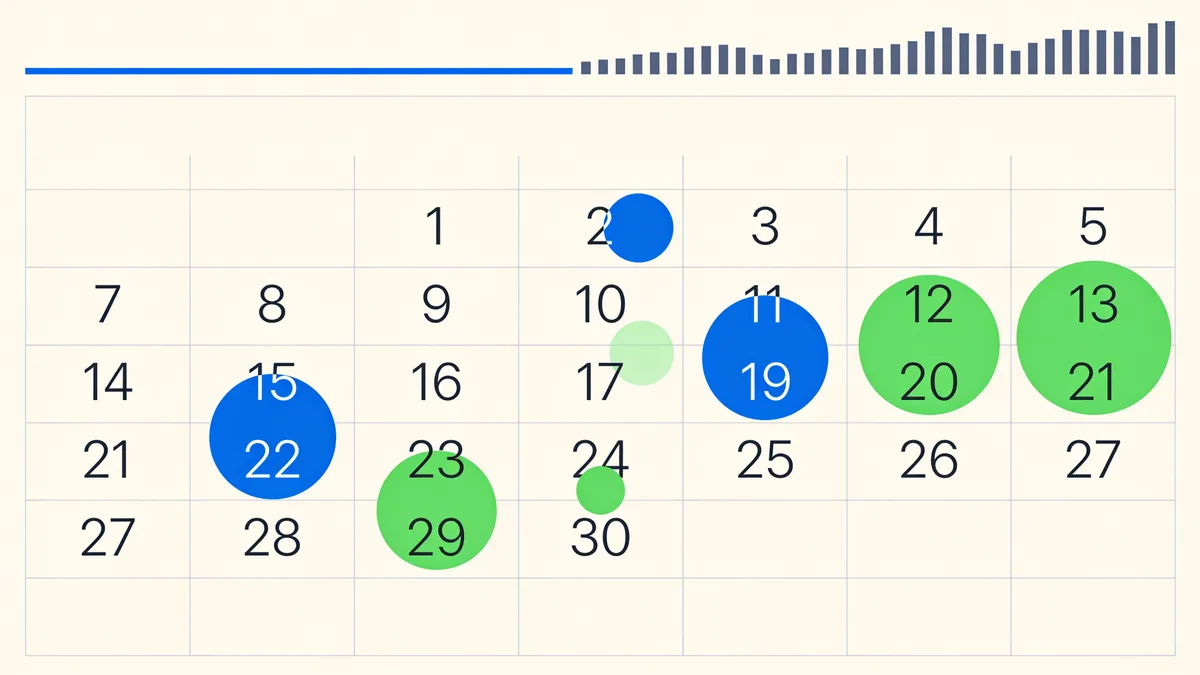
Search a URL and you land on the calendar view. Two instruments do all the work. The bar graph along the top shows captures per year, a fast way to see when a site was alive, when it was busy, and when it went dark. The calendar below marks every captured day of the selected year.
- Blue circle: a normal capture that returned a 200 OK.
- Green circle: the capture was a redirect. The crawler followed it, so check where it landed.
- Red mark: an error response, usually a 404 or 500. Rarely worth opening.
- Bigger circle: more captures that day. Hover a day for exact times, click a timestamp to open it.
Open a snapshot and a banner sits on top of the page. It carries the exact UTC timestamp, arrows for the previous and next capture, and an 'About this capture' panel with crawl metadata. When you are hunting for a specific change, say, when a company dropped its refund clause, do not click random days. Scan for clusters and gaps, then bracket the change between the last capture that has it and the first that does not.
Wayback Machine Search Syntax Worth Memorizing
The homepage search box is the slowest way in. The URL itself is the real interface, and a handful of patterns covers almost everything you will ever need.
| Pattern | What it does | Example |
|---|---|---|
| web.archive.org/web/2020/URL | Closest capture to January 1, 2020 | web.archive.org/web/2020/example.com |
| web.archive.org/web/20200615143000/URL | Closest capture to an exact second (UTC, YYYYMMDDhhmmss) | web.archive.org/web/20200615143000/example.com |
| web.archive.org/web/*/URL | Calendar of every capture of that one page | web.archive.org/web/*/example.com/pricing |
| web.archive.org/web/*/domain/* | Every captured URL under a domain, filterable | web.archive.org/web/*/example.com/* |
| web.archive.org/web/2020id_/URL | Original file, no banner, no rewritten links | web.archive.org/web/2020id_/example.com |
| web.archive.org/web/2020im_/URL | Just the image asset at that timestamp | web.archive.org/web/2020im_/example.com/logo.png |
Two of these deserve special mention. The domain-wide URL list is the fastest way to find a page whose address you half-remember, type a fragment of the slug into the filter box and the archive narrows thousands of paths down to the one post you need. And the id_ modifier is what professionals use when they need the file itself rather than a re-framed preview, because it serves the original bytes without the banner and without rewriting a single link.
Save Page Now and When It Refuses
The archive is not only a reading room. Save Page Now writes to it: paste any public URL into web.archive.org/save and a crawler fetches the live page within seconds. A free account unlocks extras like saving outlinked pages and full-page screenshots. If you publish anything important, saving it the same day is the cheapest insurance on the internet.
It refuses more often than people expect. Pages blocked by robots.txt will not save. Anonymous use is rate-limited, so batch-saving fifty pages in a row will stall. Login screens save as login screens. And heavy JavaScript apps sometimes archive as an empty shell, the HTML saved fine, but the content only ever existed after scripts ran, and the scripts asked an API that is long dead.
Where the Wayback Machine Falls Short
- Anything behind a login, paywall, or POST form is never archived.
- Interactive apps that render with JavaScript often survive as empty shells.
- Streaming video and audio rarely play from old captures.
- Gaps. The one week you desperately need is reliably the week nobody crawled.
- No whole-site download. You browse one page at a time, with links rewritten to point back through the archive.
- Server-side code is gone forever. Snapshots hold rendered HTML; the PHP, the database, and the admin panel were never public, so they were never archived.
None of these are bugs. The archive was built for memory, not for migration, and that distinction matters the moment your goal shifts from reading an old page to rebuilding a whole website.
Getting from the Wayback Machine to a Restored Site
Browsing a snapshot answers questions. It does not hand you a website. Links point back to archive.org, assets are served from the archive's servers, and there is no export button. Copying by hand works for a page or two; a 3,000-page store copied that way is a month of your life you will not get back. This is the point where people stop researching and start looking for a Wayback Machine restore instead.
That gap is exactly what this service was built for. It pulls every archived file of a domain, rebuilds working internal links, and shows a free estimate first, the exact file count, total size, and a locked price before you pay anything. Restores are paid per file, the first file is free, and failed restores refund automatically to your balance. Options cover the unglamorous parts that matter: stripping old analytics and ad scripts, converting links to relative, forcing HTTPS, keeping 301 redirects alive, and exporting structured article data as XML, CSV, or JSON.
When the files are ready, one click deploys them to your own VPS over SSH or SFTP, to shared hosting over FTP, or to an S3 bucket, and every deploy includes a small single-file CMS at /webarchive-cms.php, so the restored site is editable the moment it lands. The tutorial walks through a full run in about ten minutes.
Restore your website from the Wayback Machine
Get a free estimate in seconds — you only pay when you confirm. Failed restores refund automatically.
FAQ
Is the Wayback Machine legal to use?
Browsing is legal, and the archive operates as a library. Copyright still applies to what you do with the content, reading an old page is fine, republishing someone else's text wholesale is not. Restoring your own site, or content you hold the rights to, is the common and safe case.
How far back does the Wayback Machine go?
Crawl data starts in 1996, so the oldest captures are nearly three decades old. Coverage from the 1990s is sparse, though; things get reliably dense from the mid-2000s onward.
Why is a snapshot missing its images or styling?
Each asset is captured separately, and some were never fetched, blocked by robots.txt, served from a different domain, or simply missed that day. The HTML survived; the paint did not. Try a capture a few days earlier or later.
Can I download an entire website from the Wayback Machine?
The archive itself has no site-download button. You can save pages one by one, or use a restore service such as Restorix that reassembles the whole domain, our guide to [downloading entire websites from archive.org](/en/download-entire-website-from-archive-org) walks through every option.
How do I remove my own site from the Wayback Machine?
Add a disallow for the ia_archiver crawler in robots.txt, or send an exclusion request to the Internet Archive. Blocks can hide past captures too, not just future ones.
Does the Wayback Machine archive social media?
Partially. Public posts and profiles get captured, but feeds built on logins and infinite scroll archive poorly. Treat social captures as lucky finds, not a dependable record.
Related guides

wayback
How to Use Wayback Every Day: Lost Pages, Dead Links, Old Claims
Wayback is the quickest way to recover a lost page, check what a site said last year, cite a dead link, or vet a company before you pay. Here is how.

the way back machine
The Way Back Machine: What It Is and Why It Exists
Searching for 'the Way Back Machine'? You found it, officially the Wayback Machine. Here is what it is, who built it, and what it can and can't do.
wayback machine restore
Wayback Machine Restore: 4 Pitfalls and How to Avoid Them
A wayback machine restore can fail quietly: parked pages, redirect chains, missing images, mixed timestamps. How to spot each pitfall and avoid it.

download entire website from archive org
Download an Entire Website from Archive.org, Not Just the Homepage
To download an entire website from archive.org you need every page, image and stylesheet. Assets hide under different timestamps, here is why, plus a full checklist.